 OVER
Mario Kart 8 Deluxe 'Select a Mii' fix on Eden
Stuck on 'Select a Mii' in Mario Kart 8 Deluxe? Create a Mii in Eden's Mii editor, check your firmware, and switch drivers if the applet screen is garbled.
Eden is the most active Switch emulator on Android — and Mario Kart 8 Deluxe mostly just works on it. The one place it stops people cold is the "Select a Mii" screen: the game asks you to pick a Mii to drive with, and if there's no Mii to pick — or the screen itself won't render — you go no further. Here's the fix, tested on an AYN Odin 3 running Eden v0.2.1.
What the "Select a Mii" screen is
When Mario Kart 8 Deluxe needs a driver Mii, it opens the Switch's Mii picker — a system applet, not part of the game itself. On Eden, that applet comes from the firmware you installed. So this screen going wrong means one of two things:
- The picker opens but is empty, or the game sits on the screen and won't proceed: no Mii exists in Eden yet.
- The screen freezes outright: an old Eden build. Eden fixed the freeze in the Mii selection menu of Mario Kart 8 Deluxe in 0.0.3 (November 2025), and fixed the remaining MK8DX controller applet freezes in 0.0.3 RC3 — so any current build already includes the fix. Anything older than 0.0.3 can hang right here.
Your GPU driver matters
The applet screens — the Mii editor included — are rendered through your GPU driver, so a bad driver can make the applet unusable even when everything else is set up right. We hit this first-hand on an Odin 3:
- With Apex v2 drivers, opening the applet gave a graphical bug where you couldn't see the screen at all.
- Switching to MrPurple's Turnip T30 fixed it — the Mii editor renders normally.
If the Mii editor screen is garbled, blank, or unreadable, switch drivers before anything else. Use MrPurple T30.
Get the driver: grab MrPurple T30 from Overclocked's GPU driver hub — find the purple-turnip card and hit Download. The file is turnip_mrpurple_T30-toasted.adpkg.zip (latest release August 17, 2026, direct from MrPurple666's official GitHub releases). Then install it in Eden: tap the gear icon → GPU driver manager → Install → pick the downloaded file → select T30 as the active driver. Keep your previous known-good driver installed too, so you can switch back if a game breaks.
The fix
- Update Eden. The current stable release is v0.2.1 (June 1, 2026) — get it from eden-emu.dev, which links to Eden's own releases page (the old GitHub Releases mirror is down on a DMCA takedown). Nightly builds come out daily if you want the freshest fixes. If you're on anything older than 0.0.3, the freeze is a known Eden bug, not your game — and every build since 0.0.3 already includes the fix.
- Install matching keys and firmware from your own console. Eden needs your prod.keys, and the Mii editor applet only exists if firmware is installed. Install the firmware as a ZIP with the firmware .nca files at the root of the archive, not inside a subfolder. Keys and firmware must match each other's version. If firmware isn't installed, the Applet launcher entry just shows "Firmware not installed" and asks you to install prod.keys and firmware first.
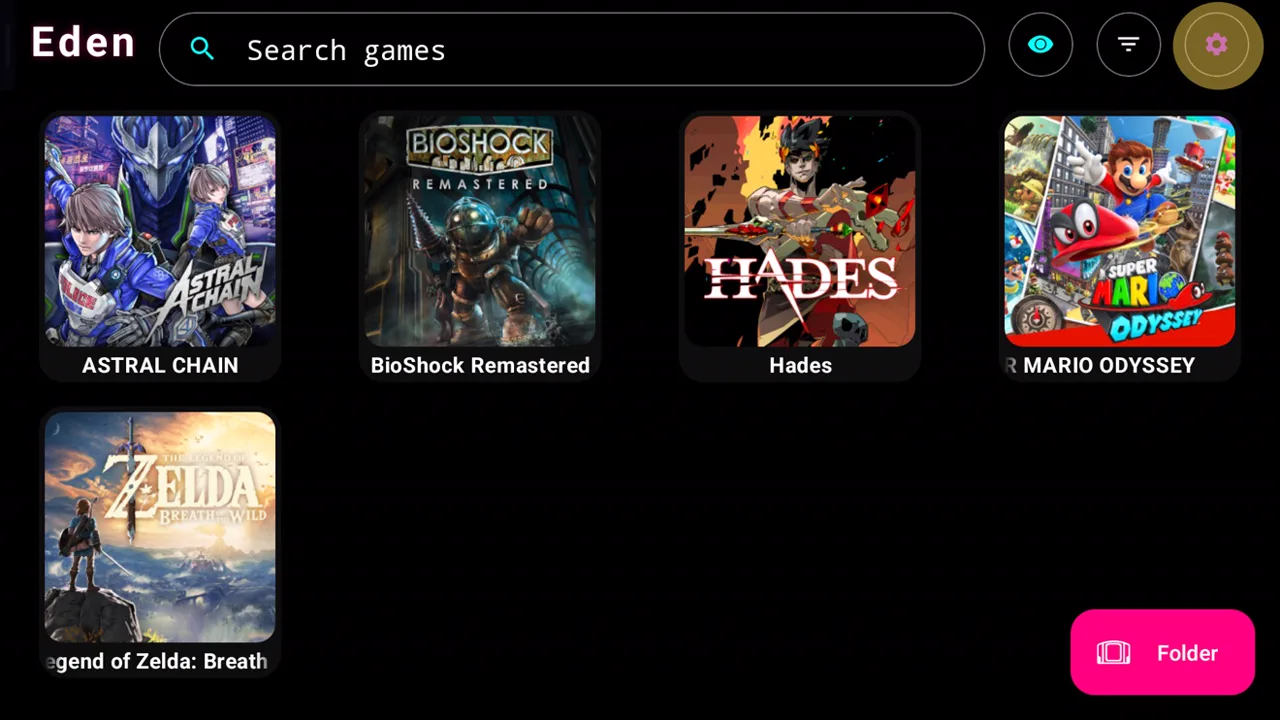
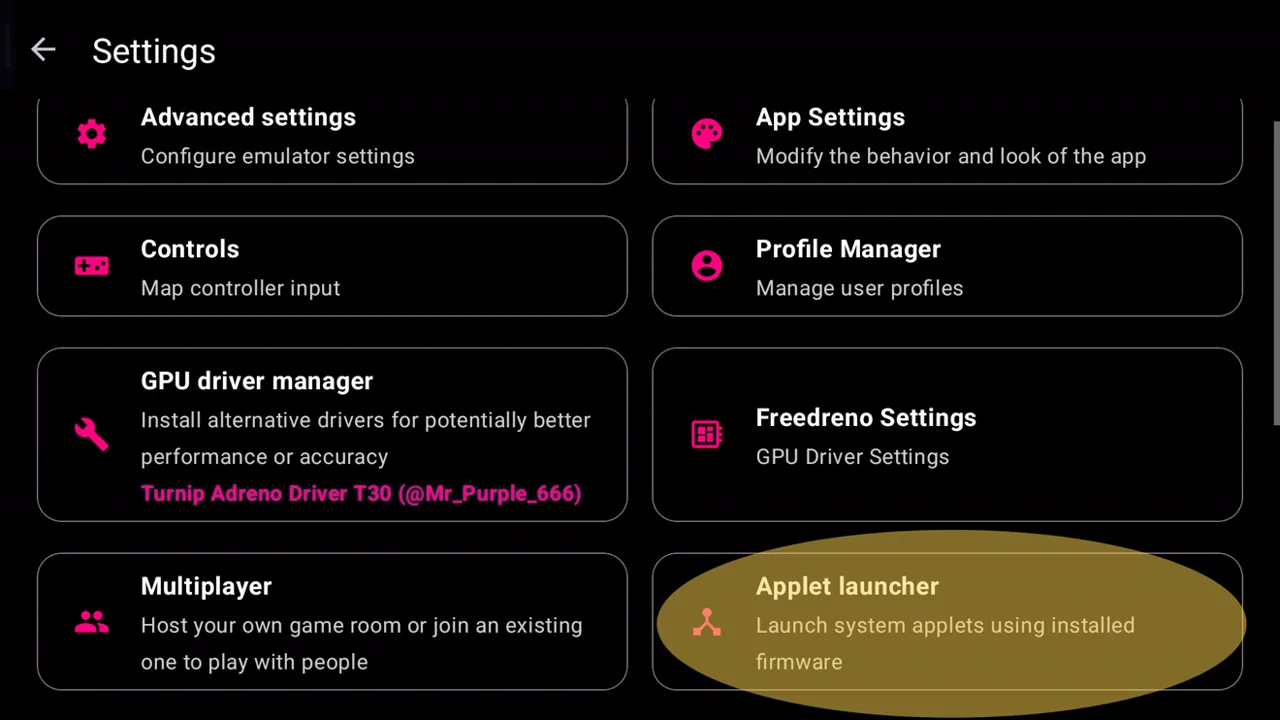
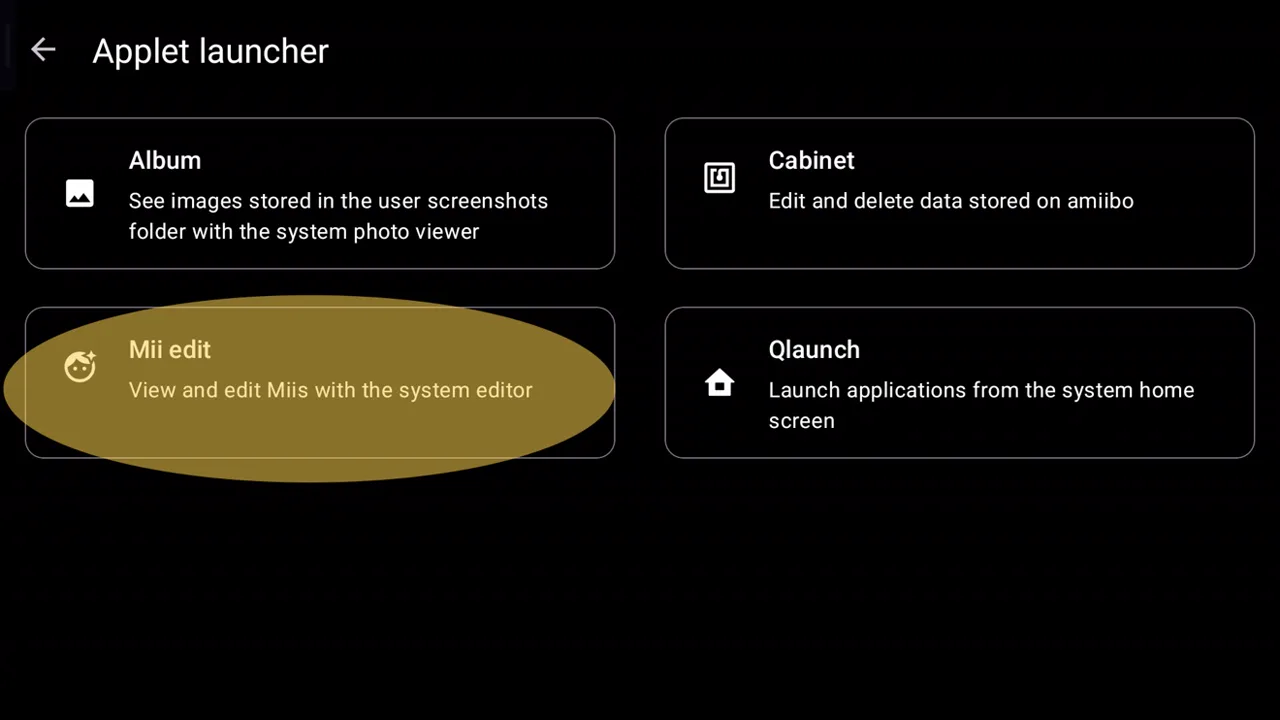
- Open the Mii editor. From Eden's home screen, tap the gear icon (Settings) at the top left. In the Settings list, tap "Applet launcher" — "Launch system applets using installed firmware" — it sits between Multiplayer and Manage Eden data. That opens a list of four applets: Qlaunch, Album, Mii edit, and Cabinet.
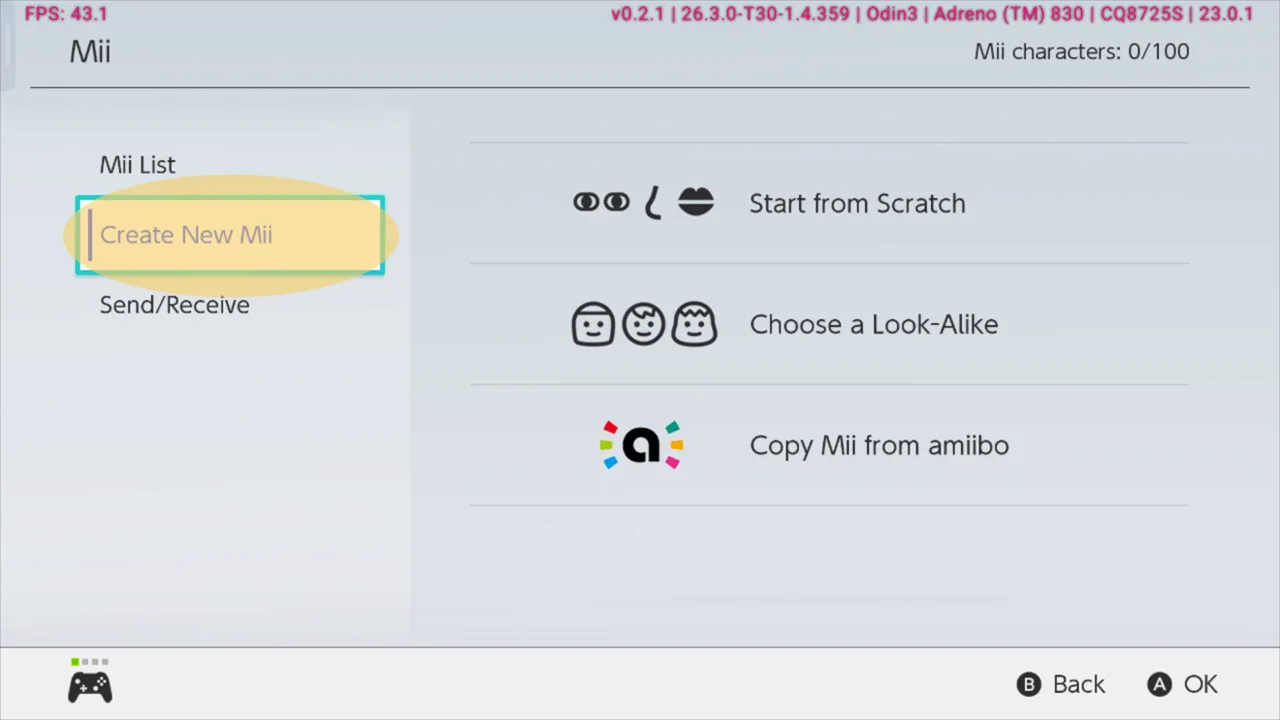
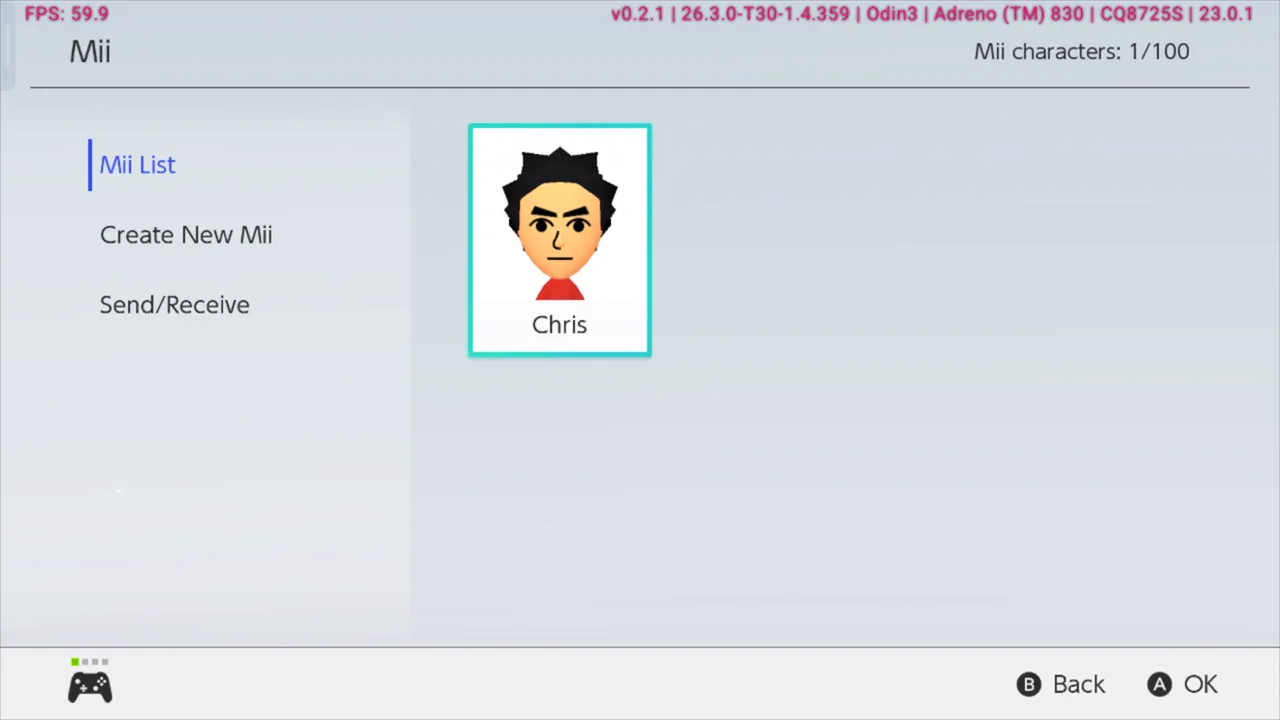
- Create a Mii. Tap "Mii edit" ("View and edit Miis with the system editor"). Nintendo's system Mii editor opens. Pick Create New Mii, then Start from Scratch (or Choose a Look-Alike), design the Mii, give it a name, and save it. It shows up in the Mii List afterwards.
- Launch Mario Kart 8 Deluxe. When "Select a Mii" pops up, pick the Mii you just created. The game should proceed normally from there.
Follow the fix in pictures
1Open Eden — tap the gear icon at the top right.
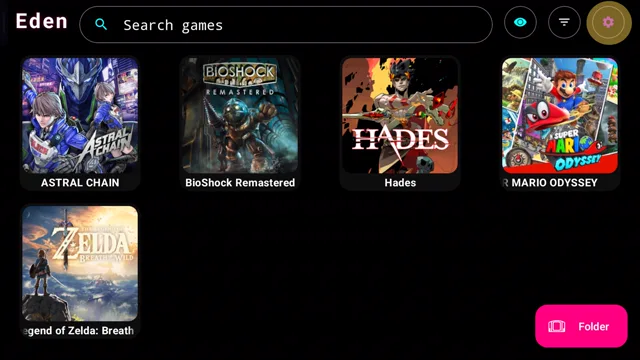 This opens Eden's Settings from the game list.
2Tap Applet launcher, circled below — and check your driver while you're here.
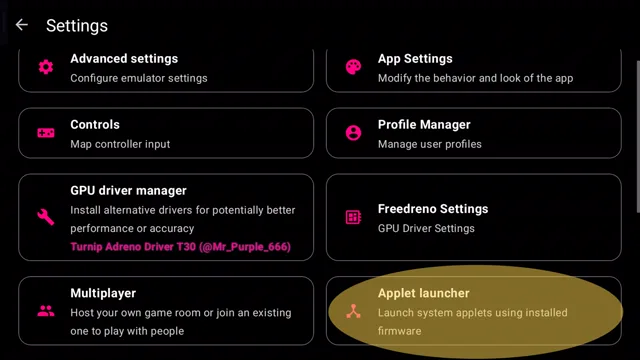 GPU driver manager shows Turnip Adreno Driver T30 (@Mr_Purple_666) as the active driver.
3Tap Mii edit in the Applet launcher.
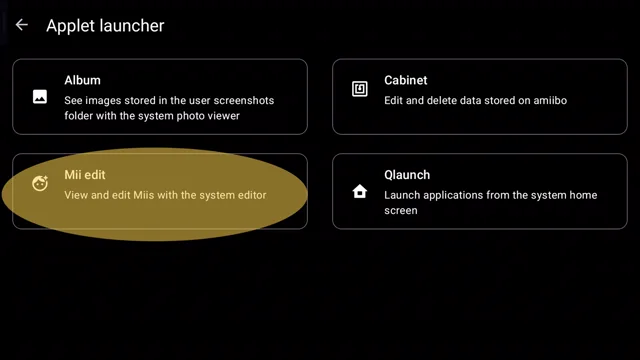 The four applets: Album, Cabinet, Mii edit, Qlaunch.
4Pick Create New Mii, then Start from Scratch.
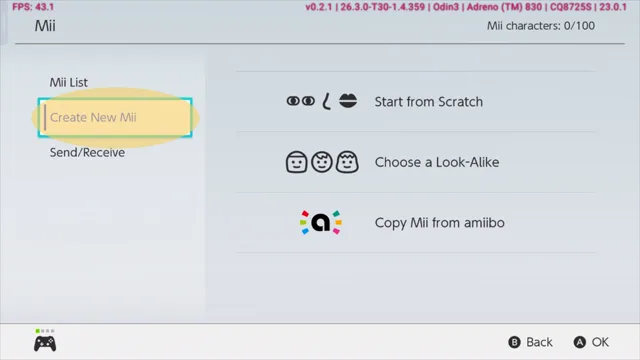 Start from Scratch, Choose a Look-Alike, or Copy Mii from amiibo.
5Your finished Mii shows up in the Mii List — that's the one Mario Kart will offer you.
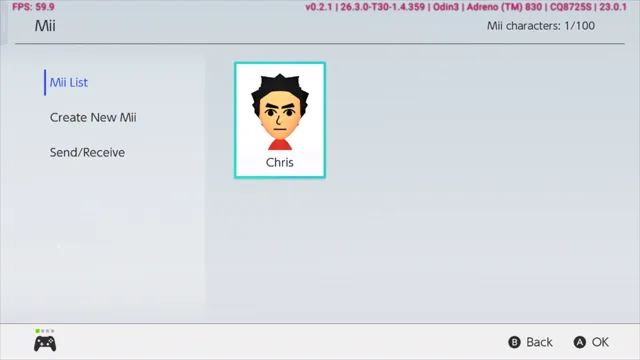 The overlay shows Eden v0.2.1 with the MrPurple T30 driver (26.3.0-T30-1.4.359) on an Odin 3.
If it still won't go past the screen
- The Mii editor won't open: your firmware isn't installed right. Reinstall matching prod.keys and firmware from your own console, then fully close and reopen Eden. An applet that won't open is the classic sign of missing or mismatched firmware.
- The applet screen is garbled or blank: switch GPU drivers — use MrPurple T30 (see above). This is the most common cause once firmware is confirmed good.
- It still freezes on a current Eden build: check that your base game, update and DLC all match — same region, same Title ID (0100152000022000). A mismatched set is the most common cause of a freeze this early in the game.
- Black screen instead of the picker: install firmware if you haven't, switch the GPU driver (try the system driver first), and clear the game's shader cache. Work through our Eden crash fixes in order.
Compat reports: Eden (stable) → Compat reports: Eden Nightly → Get settings for your device in the wizard →
FAQ
Do I need firmware just for the Mii picker?
Yes, effectively. The Mii picker, the software keyboard, the user selector and the error dialogs are all system applets that only exist inside installed firmware. Without firmware, a game that calls one of them crashes, shows a black screen, or hangs exactly when it tries to open it.
I already have a Mii on my Switch — can I use that one?
Your Mii lives in your console's user profile, which comes across with a proper firmware and user-profile dump from your own Switch. If you only installed keys, there is no user Mii in Eden yet — make one in the Mii editor and it works the same way in the game.
Does this also fix the Mii select freeze on other Eden-based emulators?
The same fix was confirmed on Jadyx, Eden's Xbox-based fork: update to 0.3.9.0 Beta or later, go to Settings → System → Mii editor, create a Mii avatar, and the game runs normally. The cause is the same — the game needs a Mii to pick, and an up-to-date build plus a created Mii supplies it.
Why does the game ask for a Mii at all?
Mario Kart 8 Deluxe lets you race as a Mii, and the Mii it offers is the one tied to your user profile. The "Select a Mii" screen is the game asking which Mii drives — it needs at least one Mii to exist before it can proceed.
The Mii editor screen is garbled or blank — what do I do?
Switch GPU drivers. We saw this with Apex v2 drivers, which left the applet screen unreadable; MrPurple's Turnip T30 renders it normally. Grab T30 from the GPU driver hub, install it through Eden's GPU driver manager, and select it as the active driver.